Frequently Asked Questions
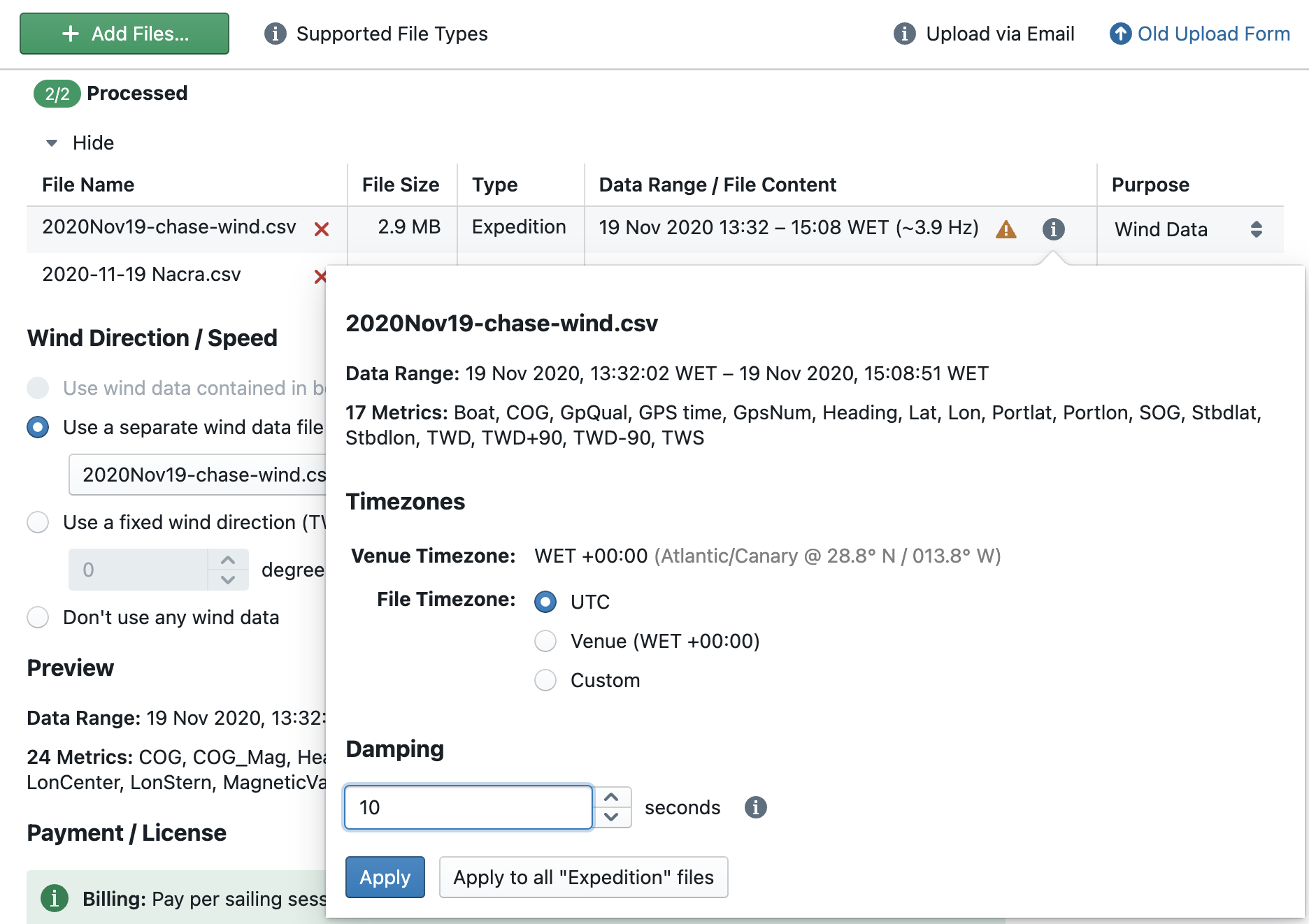
Is there a smoothing function for wind data? E.g. 5s, 10s, 15s, 30s averaging of wind coming from dinghy masts to remove noise?
When loading data and adding a wind data file (set file purpose: "Wind Data"), go to the file settings panel via the Info symbol in the uploaded files list. You can enter a custom amount of damping (in seconds) there.
My CSV file loads but the data looks wrong or metrics are missing
Check that your column headers match the standard Njord metric names listed in Metrics. Njord uses exact column names to assign meaning — for example, BoatSpeed (or BSP) is recognised as speed through water, while a column named Speed will load as an unnamed custom channel.
If a column name contains spaces or special characters, wrap it in double quotes in any formula that references it (e.g. "My Channel").
My CSV file has no absolute timestamps — can it still be used?
A CSV file with only relative timestamps (e.g. elapsed seconds) cannot be used as a standalone base file because Njord needs an absolute date and time to place the data on a timeline. However, it can be uploaded as Extra Data alongside a fully-timestamped base file. Set the File Purpose to Extra Data in the upload settings, and Njord will merge the two by aligning on their shared time range.
How do I upload two files for the same session (e.g. a log file and a heart rate monitor)?
Upload both files together in a single upload session and set the File Purpose for each:
- Set the main log file (GPS + speed data) to Base Data
- Set supplementary files (heart rate, extra sensors, wind, video overlays) to Extra Data or Wind Data as appropriate
Files uploaded separately to the same boat may not be automatically merged. When in doubt, upload them together.
My data file fails to load — what should I do?
Common causes:
- Latitude or longitude is zero or missing. Many data loggers write placeholder values of
0.0for position when GPS has no fix (e.g. immediately after power-on). Njord rejects records with zero or implausible coordinates. Wait for a GPS fix before starting your recording, or trim the file to remove the bad records. - Data logger restart mid-session. If a logger reboots mid-sail, the output file may reset its timestamp to the epoch or repeat time values. Split the file at the restart point and upload each part separately.
- Unsupported format. Check the list of supported data sources at www.sailnjord.com/data-sources. If your format is not listed, export to CSV and name the columns as described in Metrics.
I have a Vakaros — should I upload the .vkx file or the CSV export?
Upload the .vkx file directly. Njord has a native Vakaros parser that extracts all channels (including Heading) from the binary file. The CSV export from the Vakaros app omits Heading, which is needed for TWA and maneuver detection.
I use a Sailmon — how do I include the sail and maneuver events?
After your session, export both the log file and the events CSV from the Sailmon dashboard. Upload them together in one upload session, setting the events CSV File Purpose to Extra Data. Sail changes and events recorded on the water will then appear as annotations in Njord Analytics.